
Close Menu
The Hollywood Elites Magazine
  • Home
  • Film
  • Television
  • Box Office
  • Reality TV
  • Music
  • Horror
  • Books
  • Technology
  • Politics
  • Cover Story
  • Contact
    • About
    • Privacy Policy
    • DMCA / Copyright Disclaimer
    • Amazon Disclaimer
    • Terms and Conditions
What's Hot

Lili Caseley Guests On “If These Walls Could Talk” With Hosts Wendy Stuart and Tym Moss Wednesday, October 21st, 2026

Kim Kardashian’s Daughter Is Mom’s Mini-Me With Matching Hairstyles 

Trump waives Russia-linked sanctions, citing national interest

Facebook X (Twitter) Instagram
The Hollywood Elites Magazine
  • Home
  • Film
  • Television
  • Box Office
  • Reality TV
  • Music
  • Horror
  • Books
  • Technology
  • Politics
  • Cover Story
  • Contact
    • About
    • Privacy Policy
    • DMCA / Copyright Disclaimer
    • Amazon Disclaimer
    • Terms and Conditions
The Hollywood Elites Magazine
You are at:Home»Technology»What Does The Yellow Light On Your Alexa Device Mean And How Do You Clear It?
Technology

What Does The Yellow Light On Your Alexa Device Mean And How Do You Clear It?

By AdminOctober 17, 2026
Facebook Twitter Pinterest Telegram LinkedIn Tumblr Email Reddit
What Does The Yellow Light On Your Alexa Device Mean And How Do You Clear It?


What Does The Yellow Light On Your Alexa Device Mean And How Do You Clear It?

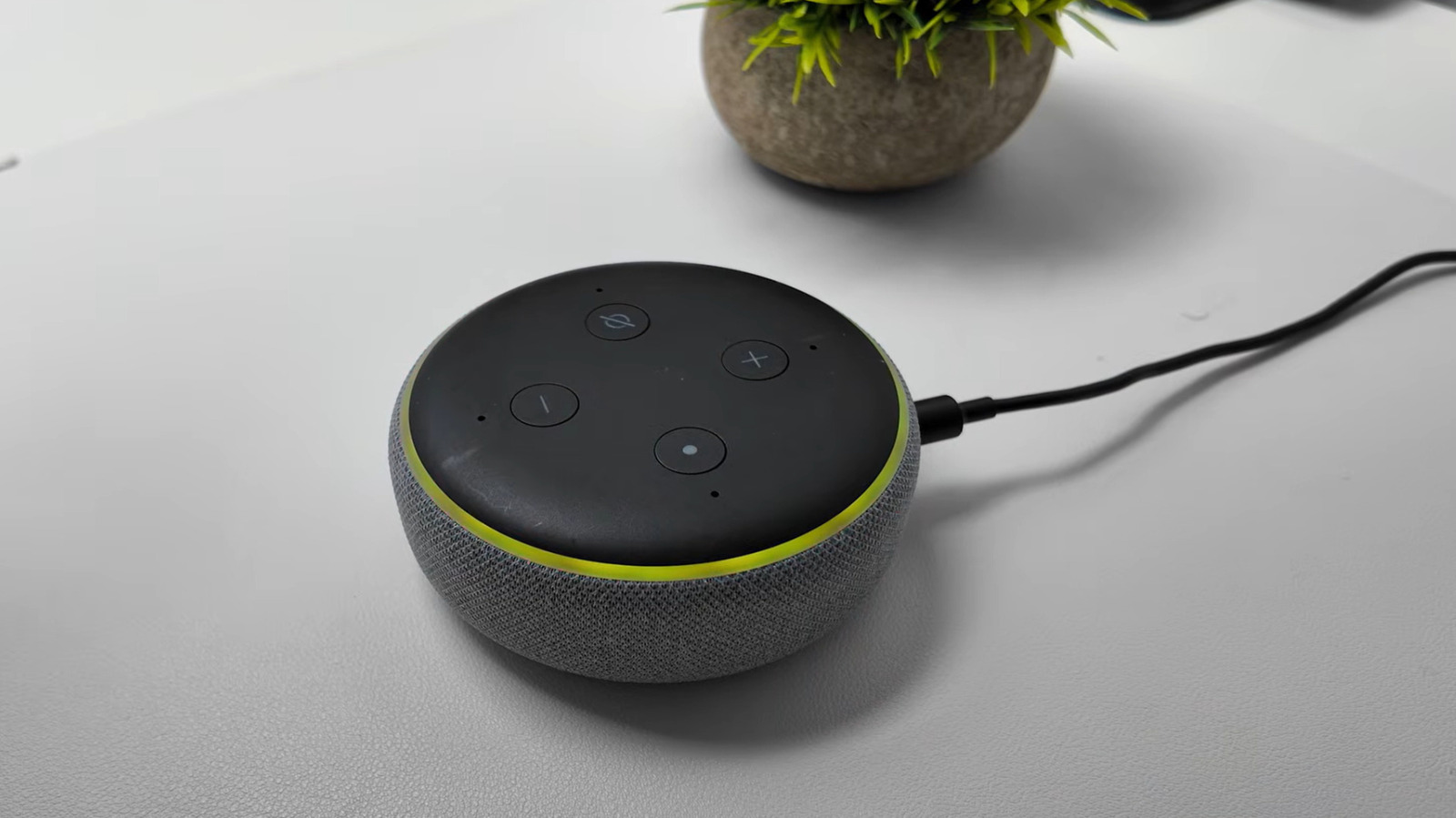
Here’s what your Echo’s yellow light is trying to tell you and what to do about it.

Your Amazon Echo’s light ring is a valuable information hub. And while most users are familiar with the recognizable blue ring, many don’t realize that the light ring can display nine different color notifications, some of which are intended to grab your attention. If you see a flashing yellow ring around your Echo device, don’t panic: a yellow light emanating in slow bursts every few seconds means that Alexa has a message or notification it would like to share with you. 

Introduced in 2017, this notification system transforms your Echo into a proactive assistant, capable of alerting you to everything from breaking news and calendar reminders to notifying you when Amazon has shipped your latest package. It is also useful for taking advantage of some of Alexa’s more advanced features, such as Alexa for Shopping’s price-drop alert tool. Ultimately, customizing your Alexa notification settings is the key to maximizing your Echo’s functionalities.

If your device begins flashing its yellow light, you can easily clear the issue by asking Alexa a question regarding your notifications or messages. For example, try “What notifications do I have?” or “What messages do I have?” From there, Alexa will recite the list of relevant notifications, which you can respond to as you see fit. You can also move through your notifications using simple phrases (such as “next” or “repeat”).

Managing your notification settings

You can edit notification settings via the Alexa app on your phone or tablet. Tap the More symbol, which looks like three horizontal lines, and select Settings (the gear icon). From there, navigate to Notifications. In this section, you can toggle the features, services and apps you would like to enable or disable notifications for. 

One setting to customize is how Alexa interacts with reminders. If the flashing yellow light is for a reminder you have missed, you can clear the notification by asking Alexa, “What are my reminders?” Then, you can issue a series of helpful commands, including asking Alexa to turn off, dismiss, snooze or reschedule your reminder. To change reminder notification settings, navigate to the Notifications section of your Alexa app. From there, select Reminders on this Device and toggle your Notifications on or off. 

Another useful notification center is your Alexa Skills hub. Alexa Skills are voice-activated applications that expand Alexa’s capabilities. The apps span a range of functions, including Health & Fitness, Productivity, Smart Home features, Sports, Education and even Trivia games. To edit your Alexa Skills notifications, open the Alexa app, then navigate to More > Skills & Games. From there, select Your Skills > Settings > Manage Account Permissions, toggle Notifications on or off and select Save Permissions. 

You may also receive a notification if your Alexa-connected smart camera or doorbell detects a person, a package or a similar camera event. To manage these alerts, return to your Alexa app and select Devices. From there, select your connected camera and tap Device Settings. Next, toggle Person or Package Detection Announcements to your desired setting. Now, when your Alexa+ answers the doorbell, you’ll have a yellow notification ring waiting for you.

A guide to your Echo’s light scheme

Your Echo uses a range of lights to indicate its status. You are likely familiar with the iconic cyan light, which tells you Alexa is listening and glimmers whenever Alexa has heard and is processing a request. The cyan ring will also shimmer whenever your device receives a software update. A teal-blue light, on the other hand, signals that Alexa is waiting for you to issue a command. If you see the two shades of blue spinning around the outer ring, your device is likely starting up or restarting after a completed software update. 

A red ring shows a key functionality is turned off. Appearing when you press the microphone on/off button, for instance, it tells users that the device’s microphone is disconnected. To get rid of the light, simply press your microphone button again. For an Echo with a camera, a red light bar indicates that the device will not share your video.

If you see a bright orange light spinning around the outside edge of your Echo, the device is either in setup mode or trying to connect to the internet. A pulsing green light, meanwhile, means that you have an incoming call. Once you answer the call, the green ring will begin to spin. The effect is also used for active Drop In intercom sessions. A brief purple flash means that your device is in Do Not Disturb mode. During setup, it indicates Wi-Fi issues. Lastly, a white light shows the volume level whenever you adjust it.


Original Source Link

Share. Facebook Twitter Pinterest LinkedIn Reddit WhatsApp Telegram Email
Previous ArticleBusiness Books That Challenge the Rules of Success
Next Article Rockers We’ve Lost in 2026

Related Posts

The Leap Second Is No More

October 17, 2026

Analogue Returns To The 16-Bit Era With The Mega Sg+ And Super Nt+

October 16, 2026

Skechers Coupon Codes 20% Off

October 16, 2026

Meta Built A Huge Open-Weight AI Model For Macs, But You’ll Need 1TB Of RAM To Run It

October 15, 2026

ABT Promo Codes & Discounts for October 2026

October 15, 2026

YouTube Music Adds New Labels For AI-Generated Content

October 14, 2026
Recent Posts

Trump’s latest moves on Russia leave Ukraine facing a new dilemma in the war

How ‘Crystal Lake’ Uproots the Horrors of America’s History for Jason’s Origin Story

Donnie Wahlberg Explains Baez & Elena’s Shocking Family News (Exclusive)

Klara and the Sun review – send it back to the…

Apple Watch Ultra 3 Drops to Record-Low $649

The Leap Second Is No More

Barnes & Noble’s Picks for the Best Books of 2026

Categories
  • Art (2)
  • Books (2,412)
  • Box Office (1,777)
  • Business (5)
  • Cover Story (85)
  • Events (16)
  • Featured Stories (50)
  • Film (2,428)
  • Horror (2,413)
  • Music (2,490)
  • Politics (1,595)
  • Reality TV (1,875)
  • Technology (2,423)
  • Television (2,325)
  • Uncategorized (2)
Archives
Useful Links
  • About
  • Contact
  • Privacy Policy
  • DMCA / Copyright Disclaimer
  • Amazon Disclaimer
  • Terms and Conditions
Popular Posts

Brooklyn Store Responds After Kelly Clarkson’s Story

October 12, 2026

Borat Warns People Not to See Sacha Baron Cohen’s New Film

October 12, 2026

Mike Love Rejoins The Beach Boys on Stage Amid Health Issues

October 12, 2026

I Made Terrible Games With Google’s AI Playground

October 12, 2026

Behind the Famous Paintings, Three Girls’ Lives Shatter Amid War

October 12, 2026

‘Resident Evil’ No. 1, Zach Cregger Record

October 11, 2026

Barbara Palvin Celebrates 1st Birthday as a Mom With Dreamy Baby Photos 

October 11, 2026
Categories
  • Art (2)
  • Books (2,412)
  • Box Office (1,777)
  • Business (5)
  • Cover Story (85)
  • Events (16)
  • Featured Stories (50)
  • Film (2,428)
  • Horror (2,413)
  • Music (2,490)
  • Politics (1,595)
  • Reality TV (1,875)
  • Technology (2,423)
  • Television (2,325)
  • Uncategorized (2)
Recent Posts
  • Lili Caseley Guests On “If These Walls Could Talk” With Hosts Wendy Stuart and Tym Moss Wednesday, October 21st, 2026
  • Kim Kardashian’s Daughter Is Mom’s Mini-Me With Matching Hairstyles 
  • Trump waives Russia-linked sanctions, citing national interest
  • THE MOVIE AGENCY UNVEILS FIRST LOOK AT ITALIAN AI-HORROR ‘DROID HOUSE’ AS SMART-HOME ANXIETY CLIMBS GLOBAL HEADLINES
  • Bunnie Xo Continues To ‘Rage Bait’ Dylan Wolf Romance
  • All the Best Video Game Easter Eggs
  • Rockers We’ve Lost in 2026
Our Picks

Lili Caseley Guests On “If These Walls Could Talk” With Hosts Wendy Stuart and Tym Moss Wednesday, October 21st, 2026

Kim Kardashian’s Daughter Is Mom’s Mini-Me With Matching Hairstyles 

Trump waives Russia-linked sanctions, citing national interest

THE MOVIE AGENCY UNVEILS FIRST LOOK AT ITALIAN AI-HORROR ‘DROID HOUSE’ AS SMART-HOME ANXIETY CLIMBS GLOBAL HEADLINES

© 2026 The Hollywood Elites Magazine. All rights reserved. All articles, images, product names, logos, and brands are property of their respective owners. All company, product and service names used in this website are for identification purposes only. Use of these names, logos, and brands does not imply endorsement unless specified. By using this site, you agree to the Terms & Conditions and Privacy Policy.

Type above and press Enter to search. Press Esc to cancel.

We use cookies on our website to give you the most relevant experience by remembering your preferences and repeat visits. By clicking “Accept All”, you consent to the use of ALL the cookies. However, you may visit "Cookie Settings" to provide a controlled consent.
Cookie SettingsAccept All
Manage consent

Privacy Overview

This website uses cookies to improve your experience while you navigate through the website. Out of these, the cookies that are categorized as necessary are stored on your browser as they are essential for the working of basic functionalities of the website. We also use third-party cookies that help us analyze and understand how you use this website. These cookies will be stored in your browser only with your consent. You also have the option to opt-out of these cookies. But opting out of some of these cookies may affect your browsing experience.
Necessary
Always Enabled
Necessary cookies are absolutely essential for the website to function properly. These cookies ensure basic functionalities and security features of the website, anonymously.
CookieDurationDescription
cookielawinfo-checkbox-analytics11 monthsThis cookie is set by GDPR Cookie Consent plugin. The cookie is used to store the user consent for the cookies in the category "Analytics".
cookielawinfo-checkbox-functional11 monthsThe cookie is set by GDPR cookie consent to record the user consent for the cookies in the category "Functional".
cookielawinfo-checkbox-necessary11 monthsThis cookie is set by GDPR Cookie Consent plugin. The cookies is used to store the user consent for the cookies in the category "Necessary".
cookielawinfo-checkbox-others11 monthsThis cookie is set by GDPR Cookie Consent plugin. The cookie is used to store the user consent for the cookies in the category "Other.
cookielawinfo-checkbox-performance11 monthsThis cookie is set by GDPR Cookie Consent plugin. The cookie is used to store the user consent for the cookies in the category "Performance".
viewed_cookie_policy11 monthsThe cookie is set by the GDPR Cookie Consent plugin and is used to store whether or not user has consented to the use of cookies. It does not store any personal data.
Functional
Functional cookies help to perform certain functionalities like sharing the content of the website on social media platforms, collect feedbacks, and other third-party features.
Performance
Performance cookies are used to understand and analyze the key performance indexes of the website which helps in delivering a better user experience for the visitors.
Analytics
Analytical cookies are used to understand how visitors interact with the website. These cookies help provide information on metrics the number of visitors, bounce rate, traffic source, etc.
Advertisement
Advertisement cookies are used to provide visitors with relevant ads and marketing campaigns. These cookies track visitors across websites and collect information to provide customized ads.
Others
Other uncategorized cookies are those that are being analyzed and have not been classified into a category as yet.
SAVE & ACCEPT