

Close Menu
The Hollywood Elites Magazine
  • Home
  • Film
  • Television
  • Box Office
  • Reality TV
  • Music
  • Horror
  • Books
  • Technology
  • Politics
  • Cover Story
  • Contact
    • About
    • Privacy Policy
    • DMCA / Copyright Disclaimer
    • Amazon Disclaimer
    • Terms and Conditions
What's Hot

Rocky Kramer’s Rock & Roll Tuesdays Presents “Working For The Weekend” On Tuesday, September 8th, 2026 7 PM PT on Twitch

‘Moonlight’ Getting 10th Anniversary 4K Re-Release This Fall

Kaia Gerber Is Literally Mom Cindy Crawford’s Twin in Sweet Birthday Post

Facebook X (Twitter) Instagram
The Hollywood Elites Magazine
  • Home
  • Film
  • Television
  • Box Office
  • Reality TV
  • Music
  • Horror
  • Books
  • Technology
  • Politics
  • Cover Story
  • Contact
    • About
    • Privacy Policy
    • DMCA / Copyright Disclaimer
    • Amazon Disclaimer
    • Terms and Conditions
The Hollywood Elites Magazine
You are at:Home»Technology»How To Check Your PC’s Hard-Drive Health
Technology

How To Check Your PC’s Hard-Drive Health

By AdminSeptember 6, 2026
Facebook Twitter Pinterest Telegram LinkedIn Tumblr Email Reddit
How To Check Your PC’s Hard-Drive Health


A few built-in checks can tell you whether your HDD or SSD is showing signs of trouble.


A pile of storage drives with a PC in the background.
myphotobank.com.au/Shutterstock

Storage drives have a tendency to fail when you least expect it. A traditional hard drive may give you a warning with clicking or grinding sounds, but an SSD has no moving parts to make a fuss. Problems with either type can manifest as corrupted files, abnormally slow access, frequent read or write errors, crashes, or a drive that periodically disappears from Windows.

If any of that is already occurring, back up your important files before doing much else. Diagnostics are good, but it’s not as much fun to recover the only copy of something when a drive dies.

Windows has several built-in methods for checking the health of drives, but the information it can provide will vary based on the hardware in the computer. Free utilities can go further and read the drive’s Self-Monitoring, Analysis and Reporting Technology (SMART) data.

There is one limitation, though. A healthy status can be reassuring, but it’s certainly not a lifetime guarantee.

See what Windows knows about your drive
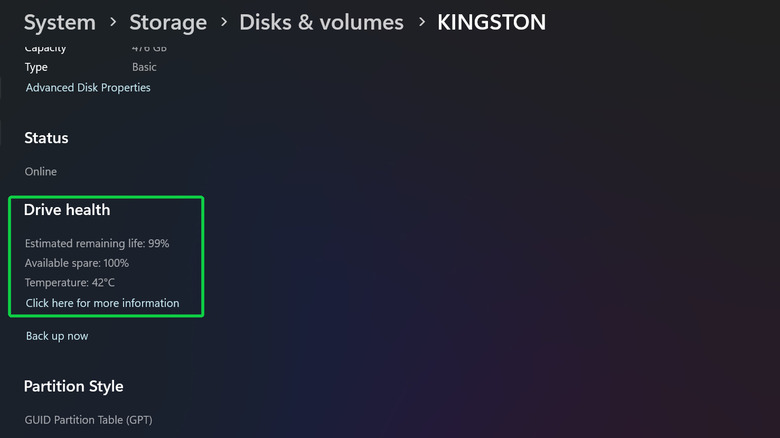

Windows 11 storage settings showing health information for an NVMe SSD.
Screenshot by Husain Parvez (Microsoft)

The simplest way to get started in Windows 11 doesn’t involve opening a terminal or feigning a love for command lines.

  1. Open Settings and choose System.
  2. Go to Storage > Advanced storage settings > Disks & volumes.
  3. Select your drive and choose Properties.

Windows can display estimated remaining life, available spare capacity and temperature for supported NVMe SSDs. It can also alert you if spare capacity is low, reliability has decreased or if the drive has gone into read-only mode.

There is one thing to look out for here. Microsoft says this health monitoring doesn’t cover SATA SSDs or traditional hard drives. If Windows provides little or no health information, don’t assume that it’s a clean bill of health.

Another quick check can be done via PowerShell. Open a PowerShell tab in Windows Terminal, type Get-PhysicalDisk and check the HealthStatus column. The status can be Healthy, Warning, Unhealthy or Unknown.

Older guides might instruct you to use wmic diskdrive get status instead, but that’s old advice. WMIC has been removed from currently supported versions of Windows 11, and Microsoft recommends supported alternatives like PowerShell.

How to act on Healthy, Warning or Bad results
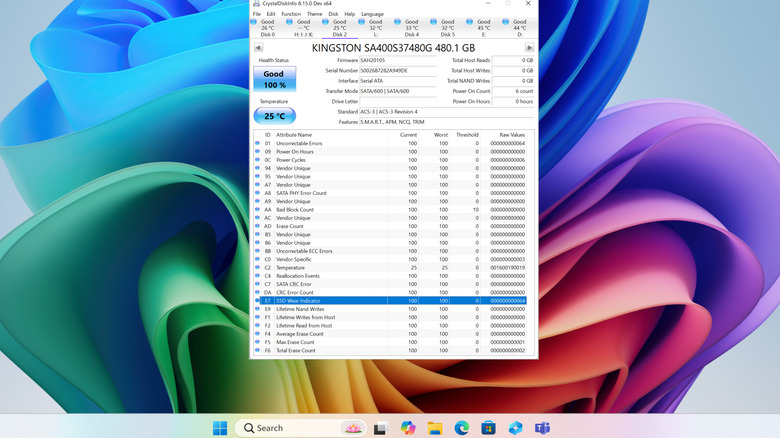

CrystalDiskInfo showing SMART health information for a storage drive.
Screenshot by Husain Parvez (CrystalDiskInfo)

If the result is Healthy and the PC is acting normally, that’s a good sign. Keep backing up your data, as drive-health systems can detect some potential issues, but not all failures.

For a second opinion, CrystalDiskInfo is a free tool that can read SMART data from many HDDs and SSDs, including NVMe drives. More importantly for those who don’t really want to spend an afternoon trying to understand what the raw storage counters mean, it gives the drive a health status of Good, Caution, Bad or Unknown.

If you get a Caution or Bad result, backing up becomes the priority. You can then verify the issue using the drive manufacturer’s own diagnostic software, like Seagate’s SeaTools or Samsung Magician (for supported Samsung SSDs). Persistent warnings, an Unhealthy result or obvious mechanical symptoms are all good reasons to stop trusting that drive with the only copy of important data and start considering a replacement.

CHKDSK is also helpful, but for a different task. It checks a volume’s file system and metadata for errors. The /f option fixes file-system errors, and the /r option locates bad sectors and attempts to recover readable data.

However, if a file-system problem is corrected with CHKDSK, the questionable hardware is not magically made healthy. For HDDs, CrystalDiskInfo can trigger a Caution status based on three SMART attributes: reallocated sectors, pending sectors and uncorrectable sectors.


Original Source Link

Share. Facebook Twitter Pinterest LinkedIn Reddit WhatsApp Telegram Email
Previous ArticleBook Riot’s Deals of the Day for September 6, 2026
Next Article Here’s Everyone Kanye West Brought Out at His Homecoming Chicago Show

Related Posts

There May Not Be an iPhone 18 This Year

September 6, 2026

Is It Worth Paying Extra For iCloud Storage?

September 5, 2026

Home Depot Labor Day Sale (2026): BOGO on Best Grills and Tools

September 5, 2026

A Worthy Android Ereader, With Some Tradeoffs

September 4, 2026

Wikipedia Workers Unionize for the First Time

September 4, 2026

HTC Vive Eagle Smart Glasses Finally Come To The West

September 3, 2026
Recent Posts

‘The Odyssey’ Crosses $1 Billion at International Box Office

Lili Reinhart’s Plunging Emanuel Ungaro Top Hangs by the Thinnest Strings

U.S. strikes 3 Iranian oil tankers after missile attacks on Navy ships

‘Ignore It’: Lily Collias to Star in Feature Version of the Viral YouTube Horror Short — Watch It Here

Jenna Dewan Explains Joining ‘DWTS’ Amid Backlash

The Last House (2026) Movie Review

Best Moments From Night 2

Categories
  • Art (2)
  • Books (2,329)
  • Box Office (1,709)
  • Business (4)
  • Cover Story (77)
  • Events (13)
  • Featured Stories (49)
  • Film (2,346)
  • Horror (2,331)
  • Music (2,405)
  • Politics (1,510)
  • Reality TV (1,793)
  • Technology (2,340)
  • Television (2,238)
  • Uncategorized (2)
Archives
Useful Links
  • About
  • Contact
  • Privacy Policy
  • DMCA / Copyright Disclaimer
  • Amazon Disclaimer
  • Terms and Conditions
Popular Posts

Bleecker Street Distribution Boss Kyle Davies Moves To Leawood Films

September 1, 2026

Below Deck Mediterranean Season 11 Episode 13 Recap

September 1, 2026

Supreme Court lets Trump build White House ballroom as lawsuit continues

September 1, 2026

The Conjuring Series at HBO Max Has a Showrunner, a Writers Room and Almost No Answers

September 1, 2026

‘GMA’ Lara Spencer Records Wildfires Amid Late Summer Vacation

September 1, 2026

Zack Snyder’s The Last Photograph Trailer Is Far Bloodier Than Any of His DCEU Movies

September 1, 2026

Man Found Guilty In Rapper’s 1996 Slaying

September 1, 2026
Categories
  • Art (2)
  • Books (2,329)
  • Box Office (1,709)
  • Business (4)
  • Cover Story (77)
  • Events (13)
  • Featured Stories (49)
  • Film (2,346)
  • Horror (2,331)
  • Music (2,405)
  • Politics (1,510)
  • Reality TV (1,793)
  • Technology (2,340)
  • Television (2,238)
  • Uncategorized (2)
Recent Posts
  • Rocky Kramer’s Rock & Roll Tuesdays Presents “Working For The Weekend” On Tuesday, September 8th, 2026 7 PM PT on Twitch
  • ‘Moonlight’ Getting 10th Anniversary 4K Re-Release This Fall
  • Kaia Gerber Is Literally Mom Cindy Crawford’s Twin in Sweet Birthday Post
  • Iran warns of ‘more painful’ response as economic pressure mounts
  • Buddy Makes Childhood Trauma Fun Again
  • Fox News Host Joe Concha Makes Blunt Demand of Mitch McConnell Amid Health Absence
  • ‘Spider-Noir’ Canceled After One Season at Amazon
Our Picks

Rocky Kramer’s Rock & Roll Tuesdays Presents “Working For The Weekend” On Tuesday, September 8th, 2026 7 PM PT on Twitch

‘Moonlight’ Getting 10th Anniversary 4K Re-Release This Fall

Kaia Gerber Is Literally Mom Cindy Crawford’s Twin in Sweet Birthday Post

Iran warns of ‘more painful’ response as economic pressure mounts

© 2026 The Hollywood Elites Magazine. All rights reserved. All articles, images, product names, logos, and brands are property of their respective owners. All company, product and service names used in this website are for identification purposes only. Use of these names, logos, and brands does not imply endorsement unless specified. By using this site, you agree to the Terms & Conditions and Privacy Policy.

Type above and press Enter to search. Press Esc to cancel.

We use cookies on our website to give you the most relevant experience by remembering your preferences and repeat visits. By clicking “Accept All”, you consent to the use of ALL the cookies. However, you may visit "Cookie Settings" to provide a controlled consent.
Cookie SettingsAccept All
Manage consent

Privacy Overview

This website uses cookies to improve your experience while you navigate through the website. Out of these, the cookies that are categorized as necessary are stored on your browser as they are essential for the working of basic functionalities of the website. We also use third-party cookies that help us analyze and understand how you use this website. These cookies will be stored in your browser only with your consent. You also have the option to opt-out of these cookies. But opting out of some of these cookies may affect your browsing experience.
Necessary
Always Enabled
Necessary cookies are absolutely essential for the website to function properly. These cookies ensure basic functionalities and security features of the website, anonymously.
CookieDurationDescription
cookielawinfo-checkbox-analytics11 monthsThis cookie is set by GDPR Cookie Consent plugin. The cookie is used to store the user consent for the cookies in the category "Analytics".
cookielawinfo-checkbox-functional11 monthsThe cookie is set by GDPR cookie consent to record the user consent for the cookies in the category "Functional".
cookielawinfo-checkbox-necessary11 monthsThis cookie is set by GDPR Cookie Consent plugin. The cookies is used to store the user consent for the cookies in the category "Necessary".
cookielawinfo-checkbox-others11 monthsThis cookie is set by GDPR Cookie Consent plugin. The cookie is used to store the user consent for the cookies in the category "Other.
cookielawinfo-checkbox-performance11 monthsThis cookie is set by GDPR Cookie Consent plugin. The cookie is used to store the user consent for the cookies in the category "Performance".
viewed_cookie_policy11 monthsThe cookie is set by the GDPR Cookie Consent plugin and is used to store whether or not user has consented to the use of cookies. It does not store any personal data.
Functional
Functional cookies help to perform certain functionalities like sharing the content of the website on social media platforms, collect feedbacks, and other third-party features.
Performance
Performance cookies are used to understand and analyze the key performance indexes of the website which helps in delivering a better user experience for the visitors.
Analytics
Analytical cookies are used to understand how visitors interact with the website. These cookies help provide information on metrics the number of visitors, bounce rate, traffic source, etc.
Advertisement
Advertisement cookies are used to provide visitors with relevant ads and marketing campaigns. These cookies track visitors across websites and collect information to provide customized ads.
Others
Other uncategorized cookies are those that are being analyzed and have not been classified into a category as yet.
SAVE & ACCEPT